Some businesses are relatively straightforward to explain online. They offer a small number of clearly defined services, each addressing a particular customer need.
Others are considerably more complicated.
A company might provide several related services, work with different industries, offer customised solutions, or combine technical expertise with ongoing operational support. Its services may overlap, depend on one another, or require detailed explanations before potential customers understand their value.
Creating a website for this type of business introduces challenges that go beyond visual design.
How should services be grouped? Which information belongs on the homepage? Should customers navigate by industry, service type, or business problem? How can a website explain complex capabilities without overwhelming visitors?
These questions are particularly relevant for B2B companies, professional service providers, consultancies, engineering businesses, and organisations offering specialised solutions.
A successful website structure makes the business easier to understand without oversimplifying what it does.
Achieving that balance begins with understanding the company’s services and how potential customers evaluate them.
Why Complex Services Need a Different Website Approach
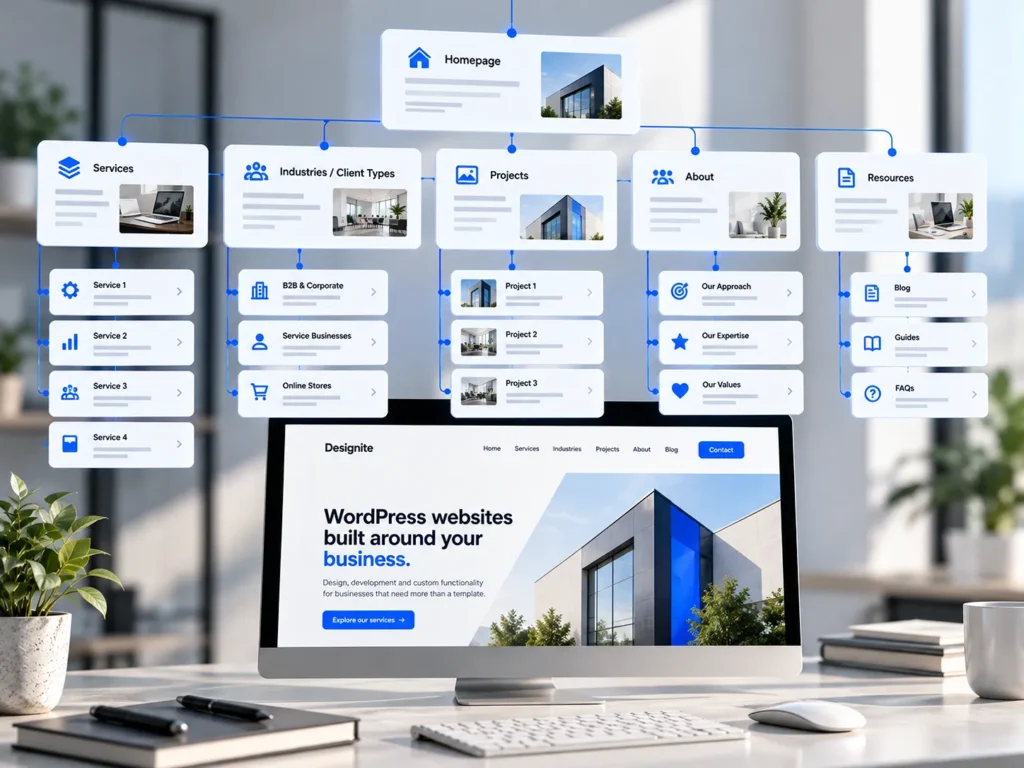
A conventional business website often follows a familiar structure: homepage, about page, services, projects, and contact information.
This can provide a useful starting point, but the existence of these pages does not guarantee that the website communicates effectively.
For businesses with multiple service areas, the challenge is deciding how information should be distributed across them.
Complexity Often Comes From the Business Model
Consider a company providing IT consultancy, infrastructure management, cybersecurity, cloud services, and software integrations.
These offerings may be sold independently, but they also overlap. A customer requesting infrastructure support might need cybersecurity assistance, while a cloud migration project could involve several departments.
Organising everything into a simple list of services may fail to communicate these relationships.
Alternatively, creating a separate page for every technical capability can produce an unnecessarily complicated navigation system.
Neither approach necessarily helps customers understand which solution fits their requirements.
The website needs a structure that represents the business accurately while remaining understandable to people who may not share its technical expertise.
Internal Organisation Is Not Always Customer-Friendly
Companies frequently organise services according to internal departments, professional disciplines, or operational responsibilities.
Customers, however, often approach the same information through different questions.
They may be trying to solve a particular problem, compare suppliers, understand an unfamiliar process, or identify whether a company has relevant experience.
A website that reproduces internal organisational structures without considering these expectations can become difficult to navigate.
The purpose of information architecture is to connect how a business understands its work with how customers search for and evaluate that work.
Start With a Complete Understanding of the Services
Before designing navigation menus or creating page layouts, the business needs a clear picture of what it offers.
This involves more than collecting existing service descriptions.
Each offering should be examined in relation to its purpose, intended customers, dependencies, and position within the broader business.
Identify Relationships Between Services
Some services are independent offerings. Others are components of a larger solution.
A business might provide website development as a primary service, with custom functionality and integrations supporting more specific requirements.
Presenting all three as unrelated offerings could obscure how they work together.
Equally, placing every capability under a single broad service page might prevent customers from finding the details relevant to their needs.
The right structure should explain both the individual services and the relationships between them.
This can be achieved through carefully planned service categories, descriptive overview pages, and contextual links between related offerings.
Distinguish Services From Capabilities
An important distinction exists between what a business sells and the capabilities it uses to deliver that service.
For example, API development may be a standalone service for some companies. For others, it is primarily a technical capability used within broader integration projects.
Turning every capability into a separate commercial service page can make the website appear fragmented.
Before creating a page, consider whether the subject represents something customers actively seek to purchase or whether it is better explained within another service.
This decision helps control unnecessary page growth while preserving useful technical information.
Build an Information Architecture That Makes Sense to Customers
Once the services are understood, they need to be organised into a logical hierarchy.
This hierarchy influences navigation, page relationships, content planning, and ultimately how easily visitors can locate relevant information.
Research from the Nielsen Norman Group on website findability distinguishes between problems caused by information architecture and those caused by navigation interface design.
Its research explains why changing menus or layouts may not solve a website’s problems when the underlying classification of information is confusing.
NN/G
Use Service Categories With Clear Boundaries
Service categories should group offerings that share a meaningful relationship.
A professional consultancy might organise services around strategic advisory, implementation, and ongoing management.
An engineering company could use categories based on project stages or technical disciplines.
The correct approach depends on how customers understand the services.
Broad categories can help visitors orient themselves, but they should not become vague labels that require additional interpretation.
A category named “Business Solutions” may sound professional while revealing very little about what visitors will find inside it.
Specific, descriptive naming usually provides a better experience.
Avoid Unnecessary Navigation Depth
Complex service portfolios sometimes lead to deeply nested navigation structures.
Visitors select a main category, then a subcategory, followed by another group before reaching an individual service.
Multiple navigation levels are not inherently incorrect, but each additional decision should serve a purpose.
If customers need to understand several internal classifications before reaching useful information, the structure may be unnecessarily difficult.
An alternative is to use well-designed service overview pages that introduce related offerings and provide direct links to more detailed content.
These pages act as navigational resources rather than simply repeating descriptions found elsewhere.
Give the Homepage a Strategic Responsibility
The homepage of a complex service business should not attempt to explain every offering in detail.
Its primary responsibility is to establish what the company does, who it serves, and where visitors should go next.
This requires careful prioritisation.
Communicate the Business Before Its Individual Capabilities
A visitor arriving on the homepage should quickly understand the company’s general area of expertise.
For specialised businesses, this can be challenging because individual services may use terminology unfamiliar to people outside the industry.
A useful introduction connects technical capabilities to the problems they address.
Instead of listing every system, framework, or methodology, the homepage can communicate the broader outcomes customers seek.
Detailed technical information can then be presented on relevant service pages.
This does not mean removing technical depth. It means introducing information in an order that supports understanding.
Create Clear Routes Into the Website
The homepage should provide logical access to important service areas, relevant industries, completed projects, and company information.
Visitors should be able to recognise which direction is appropriate for them.
For a business serving distinct customer groups, this may involve presenting navigation options based on specific industries or organisational requirements.
For another company, service categories may provide the clearest starting point.
Our article on what a business website needs to do before it needs to look impressive explores why these strategic decisions should precede detailed visual design.
Service Pages Should Help Customers Evaluate Their Options
Once visitors identify a relevant service, the individual page needs to answer more specific questions.
A common mistake is creating service pages that offer little beyond a brief description and an invitation to make contact.
This may be insufficient when customers are evaluating specialised or expensive services.
Explain the Service in Practical Terms
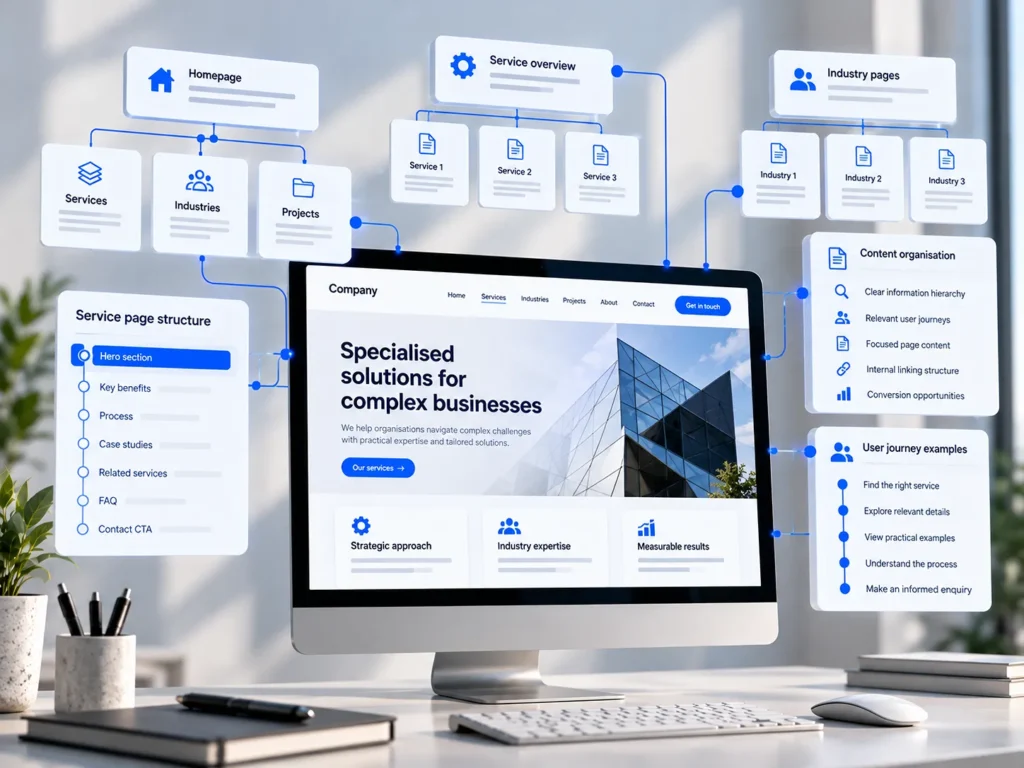
A strong service page should establish what the service involves, who it is suitable for, and the situations in which it provides value.
For technical offerings, this may require explaining implementation considerations, dependencies, and expected collaboration.
The content should demonstrate expertise without assuming that every visitor possesses the same technical knowledge.
For example, a company providing business system integrations might discuss data synchronisation, compatibility, access permissions, and ongoing maintenance.
These details help potential customers understand both the scope of the service and the company’s approach to delivering it.
They also provide more meaningful information than broad promises of quality or efficiency.
Connect Related Services Naturally
Complex business requirements rarely fit into completely isolated categories.
A customer exploring website development may also need custom functionality or an integration with existing software.
The relevant service page should explain these relationships and provide access to related information.
Contextual internal links can help visitors move between connected offerings without requiring them to return repeatedly to the main navigation.
Our article on why service pages should do more than describe a service examines how focused content and carefully planned conversion paths support this process.
Organise Content Around Different Customer Journeys
Not every visitor approaches a business website with the same level of knowledge or purchasing intention.
Some know precisely which service they need. Others understand their problem but are unfamiliar with the available solutions.
A website serving complex business requirements should accommodate both situations.
Support Visitors Who Know What They Need
Experienced buyers may search directly for a particular service, technical capability, or implementation approach.
They benefit from descriptive navigation labels, focused landing pages, and accessible technical information.
Requiring these visitors to read several general introductions before finding relevant details creates unnecessary friction.
Clear page titles and consistent terminology allow them to reach the appropriate information efficiently.
Support Visitors Who Are Still Defining Their Requirements
Other customers may need assistance understanding which service applies to their situation.
These visitors benefit from broader explanations, practical examples, and content that connects business problems with possible solutions.
A B2B website might use industry pages or application examples to demonstrate how different services work together.
However, industry-specific pages should provide genuine information, rather than reproducing identical service descriptions with only the industry name changed.
The objective is to help visitors develop a clearer understanding of their requirements before contacting the business.
Use Projects and Case Studies to Make Complex Services Tangible
Some services are difficult to evaluate through descriptions alone.
This is especially true when the work involves custom processes, technical implementation, or solutions developed around unusual business requirements.
Project examples can make these capabilities easier to understand.
Explain Problems and Solutions, Not Just Deliverables
A useful project page should establish the original business challenge, the work performed, and the reasoning behind important implementation decisions.
For a website development project, this might include information about content restructuring, custom functionality, or integration with existing systems.
The value lies in helping potential customers recognise similarities with their own requirements.
When measurable results are available and can be substantiated, they can provide additional evidence.
However, a credible project description does not need unsupported performance claims to demonstrate expertise.
Explaining a difficult implementation clearly can be equally valuable.
Plan the Technical Structure Around Content Relationships
Website architecture and content architecture should support one another.
For a complex service business, WordPress can provide structured ways to manage services, projects, industries, and related information.
These decisions affect long-term maintainability.
Use Structured Content Where It Adds Value
Custom post types and taxonomies can help businesses manage repeated content consistently.
For example, individual projects might use a dedicated content type with relationships to relevant services.
This allows the website to display related projects on service pages without manually rebuilding those connections every time content changes.
The WordPress developer documentation on custom post types explains how developers can establish dedicated structures for different kinds of content.
However, not every website needs elaborate custom content models.
A small number of service pages may be easier to maintain using standard WordPress pages.
The technical approach should reflect the amount of content, its relationships, and how frequently it needs updating.
Accessibility and Search Visibility Depend on Clear Structure
A logical website hierarchy also contributes to accessibility and search engine understanding.
Navigation labels, descriptive headings, meaningful links, and consistent page structures help people interpret the content.
These elements are particularly important when a website contains numerous specialised topics.
Make Navigation Predictable and Accessible
The Web Content Accessibility Guidelines provide internationally recognised recommendations for accessible digital content.
Within WCAG 2.2, requirements address descriptive headings, consistent navigation, meaningful link purposes, and ways to locate pages.
The W3C’s guidance on understanding WCAG 2.2 explains these principles and their practical application.
W3C
For European businesses, accessibility planning may also help address applicable legal obligations, depending on the services offered and the organisation’s circumstances.
Clear structure benefits visitors generally, including those using assistive technologies.
Give Important Services Their Own Search Context
Search visibility is another reason to define service pages carefully.
A website with a single page covering numerous unrelated offerings may struggle to communicate the specific relevance of each service.
Dedicated pages provide opportunities to explain individual offerings using focused terminology, supporting information, and relevant internal links.
However, creating more pages does not automatically improve rankings.
Each page should offer a distinct purpose and sufficient useful information.
Search-focused decisions should reinforce the customer experience rather than produce unnecessary content duplication.
Test Whether Visitors Can Find the Right Information
A website structure that seems logical to the company’s internal team may not be equally clear to its customers.
Testing helps identify misunderstandings before they become expensive design or development problems.
Evaluate Navigation Before Finalising the Design
One useful technique is tree testing, where participants attempt to find information using a simplified representation of the website’s hierarchy.
This allows businesses to investigate whether service categories and navigation labels are understandable without the influence of visual design.
The Nielsen Norman Group identifies tree testing as a method for assessing information architecture independently of the navigation interface.
NN/G
For smaller projects, direct usability sessions with representative customers can also provide valuable insight.
The objective is not to test every possible navigation variation.
It is to establish whether visitors can find important services, understand page relationships, and reach relevant contact opportunities.
Maintain the Structure as the Business Evolves
Complex service businesses rarely remain static.
New capabilities are introduced, existing services change, and the organisation may begin serving additional markets.
A website should accommodate this development without becoming increasingly difficult to navigate.
Review New Pages Before Adding Them
Whenever a new service is introduced, consider how it relates to the existing structure.
Does it belong within a current category? Does it require an independent page? Should it be presented as a capability within an established service?
These decisions should be based on the customer’s perspective and the actual commercial role of the offering.
Regular content reviews can also identify duplicated information, outdated descriptions, and pages that no longer represent the business accurately.
A maintainable structure is not one that never changes. It is one that can evolve without losing coherence.
Make Complex Services Easier to Understand, Not Less Sophisticated
A business does not need to simplify its actual services to create a clearer website.
The goal is to organise information so that customers can understand the company’s capabilities, recognise relevant solutions, and make informed decisions.
This requires a thoughtful balance between broad service categories and detailed technical content.
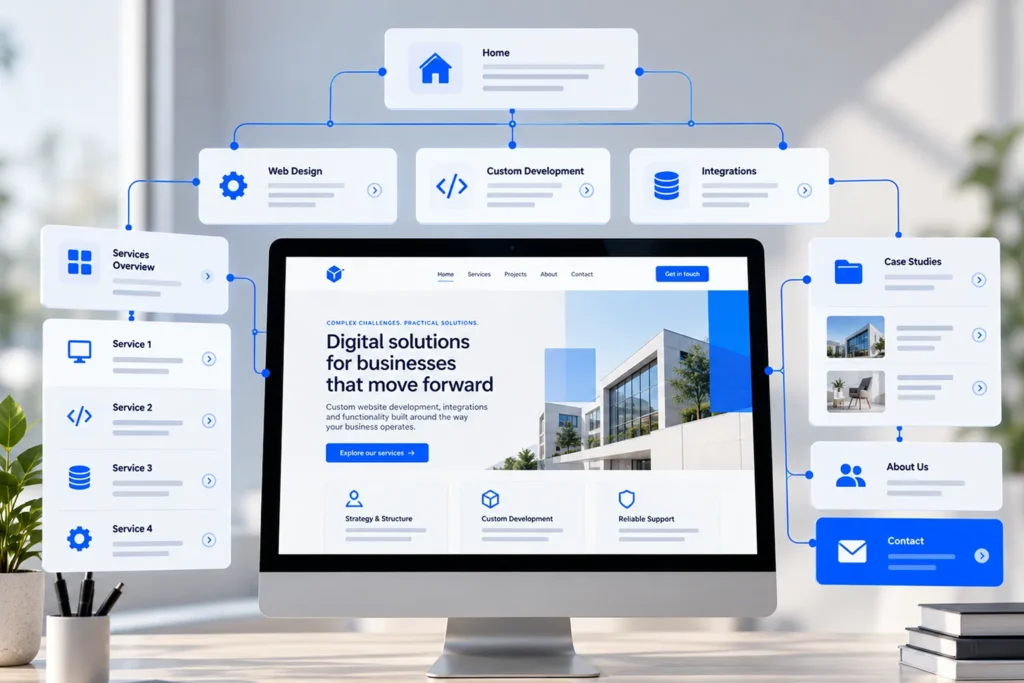
The homepage introduces the business, overview pages establish relationships, individual service pages provide depth, and project examples demonstrate practical experience.
When these elements work together, even complicated offerings become easier to explore.
At Designite, we approach website design and WordPress development by first understanding how a business operates and how its customers evaluate its services.
This allows us to develop clear content structures, purposeful user journeys, and functionality that supports the organisation’s requirements.
If your business offers multiple specialised or interconnected services, contact Designite to discuss how a more considered website structure could improve the way those services are presented.
A good website should not make a complex business appear simple. It should make that complexity understandable.